Java
Multicore Processors
- Integrated circuit that has two or more processor cores attached for enhanced performance and reduced power consumption.
- core is the execution engine.
- These processors also enable more efficient simultaneous processing of multiple tasks, such as with parallel processing and Multithreading.
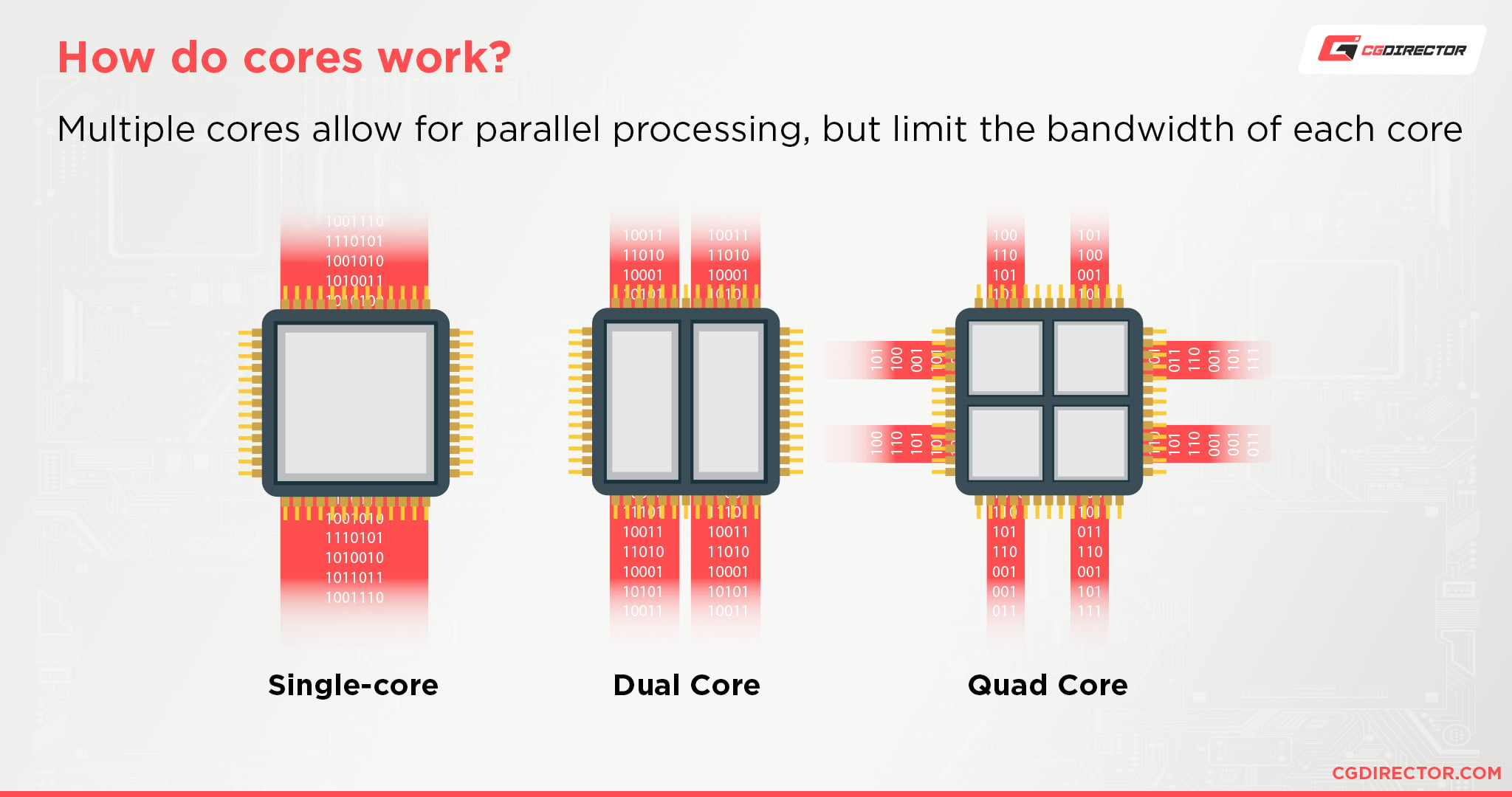
- A dual core setup is similar to having multiple, separate processors installed on a computer. However, because the two processors are plugged into the same socket, the connection between them is faster.
- Dual Core Proccessor - 2 cores
- Quad Core Processors - 4 cores
- Today's multicore processors can easily include 12, 24 or even more processor cores.
- HyperThreading : process of splitting physical cores into virtual cores – allowing a single core to process multiple threads more efficiently.
- It is essentially a way of scheduling threads to be executed by the core without any downtime.
- This isn't actually the simultaneous processing of two threads by one physical core, but rather an efficient way to have two threads prepared for optimized processing – one at a time.
Use Cases for multicore processors
- Virtualization :
- Virtualization is capable of abstracting physical processor cores into virtual processors or central processing units (vCPUs) which are then assigned to virtual machines (VMs).
- Each VM becomes a virtual server capable of running its own OS and application.
- It is possible to assign more than one vCPU to each VM, allowing each VM and its application to run parallel processing software if desired.
- Databases : The use of multiple processors in databases is often coupled with extremely high memory capacity that can reach 1 terabyte or more on the physical server.
- Analytics and HPC : Each processor to work in parallel to solve the overarching problem far faster and more efficiently than with a single processor.
- Cloud
- Visualization
Architecture of multicore processors
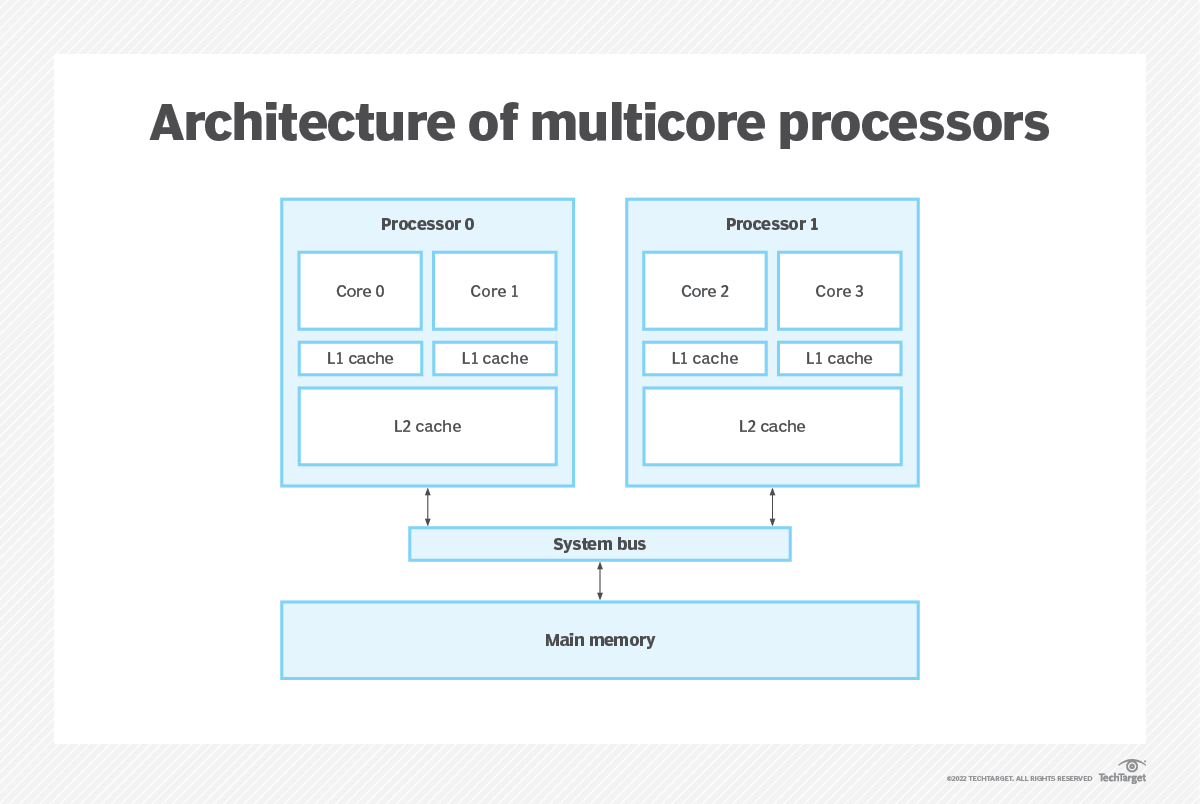
Cores: Central components or multicore processors.- Cores contain all of the registers and circuitry needed to perform the closely-synchronized tasks of ingesting data and instruction, processing that content and outputting logical decisions or results.
Processor support circuitryincludes an assortment of input/output control and management circuitry, such as clocks, cache consistency, power and thermal control and external bus access.Cachesare relatively small areas of very fast memory.- A cache retains often-used instructions or data, making that content readily available to the core without the need to access system memory.
- A processor checks the cache first. If the required content is present, the core takes that content from the cache, enhancing performance benefits.
- If the content is absent, the core will access system memory for the required content.
- A Level 1, or L1, cache is the smallest and fastest cache unique to every core.
- A Level 2, or L2, cache is a larger storage space shared among the cores.
- Some multicore processor architectures may dedicate both L1 and L2 caches.
- private L1/L2 caches for fast data access and a shared L3 cache for inter-core communication.
Examples of multicore processors
- Intel Core i9 12900 family provides 8 cores and 24 threads.
- Intel Core i7 12700 family provides 8 cores and 20 threads.
- Top Intel Core i5 12600K processors offer 6 cores and 16 threads.
Multi-Threading
- Threads - Small piece of task
- Running multiple thread
Challenges in Multi-threading
- Visibility problem :
- Threads on different core cannot see te updated variable by other thread as these updates happen on their local CPU cache
- solution : volatile variable
- Synchronization problem :
- part a : variables which are shared between inter-dependent threads (counter variable) behave unpredictably
- part b : or a critical resource (DB connection) gets exhausted due to concurrent access above capacity
- These cases need synchronization to make them predictable or enforce controlled access
- solution : Atomic operations or synchronized keyword
Atomic variable
- Increment is 3 step machine level instructions operation (read, increment, set).
- Atomic variable uses compare-and-swap (CAS) algorithm which translates increment to 1 step machine level instruction. So when a tread increments the value, it's all or nothing operation.
- CAS operation works on three operands:
- The memory location on which to operate (M)
- The existing expected value (A) of the variable
- The new value (B) which needs to be set
- The CAS operation updates atomically the value in M to B, but only if the existing value in M matches A, otherwise no action is taken.
Why to use atomic when we have synchronized and volatile?
- Synchronized has a performance hit to lock and release resources so its a bit slower and blocking in nature causing probably deadlocks or livelocks.
- Volatile variables addresses visibility problem but doesn't guarantee thread safety and synchronization
- Atomic operations are non blocking and don't have these problems.
Volatile variable
- addresses visibility problem in multithreading world where read/write to a variable from ThreadA are not always visible to ThreadB.
- Marking a variable volatile means always read/write that variable from/to main memory and not from thread specific CPU cache.
- Volatile is not always enough : when thread needs to read the variable first from main memory and generate new value based on that, this can create race condition even with correct visibility.
- Performance factor : Accessing data from main memory is expensive as compared to CPU cache and will cause performance deterioration if all variables are in main memory.
ThreadLocal variable
- Each thread gets its own copy of that variable and data is never shared across threads.
- So this rather enforces visibility of variables to each thread.
- How does ThreadLocal works?
ThreadLocal<Integer> intVal = new ThreadLocal<>();- ThreadLocal put data of the variable inside a map (ThreadLocalMap) with Thread as the key (weak reference).
- So value is retrieved from map based on which thread is calling it.
Considering ThreadLocal and ThreadPools
- while using ThreadPool, thread returns to pool once job is done.
- when same thread is borrowed again from pool, it might have previous threadlocal data, if that is not explicitly cleaned up.
- we can avoid this by manually cleaning the threadlocal once done but that is error-prone and requires rigorous code reviews.
- we can also use ThreadPoolExecutor's beforeExecute() and afterExecute() methods to do the cleanups.
ThreadLocal and Memory Leak
- In web server and application servers like Tomcat or WebLogic, web-app is loaded by a different ClassLoader than which is used by Server itself.
- This ClassLoader loads and unloads classes from web applications.
- Web servers also maintain ThreadPool, which is a collection of the worker thread, to server HTTP requests.
- Now if one of the Servlets or any other Java class from web application creates a ThreadLocal variable during request processing and doesn't remove it after that, copy of that Object will remain with worker Thread.
- and since life-span of worker Thread is more than web app itself, it will prevent the object and ClassLoader, which uploaded the web app, from being garbage collected. This will create a memory leak in Server.

Mutex
- Limit access to a critical resource, in multithreading environment, to only one thread at a time.
- Mutex is the simplest form of synchronizer.
java
public class SequenceGenerator{
    private int count = 0;
    public int getSequence(){ return count++; }
}
How to implement Mutex?
- synchronized method
java
public synchronized int getSequence(){ return count++; }- synchronized block
java
public Object mutex = new Object();
public int getSequence(){
    synchronized(mutex){ return count++; }
}- ReentrantLock
java
private ReentrantLock mutex = new ReentrantLock();
public int getSequence(){
    try{
        mutex.lock();
        return count++;
    }
    finally{
        mutex.unlock();
    }
}- Semaphore with setting limit to 1
Semaphore
used to limit number of concurrent connections to a resource
java
class SemaphoreTest{
  private Semaphore semaphore;
  public SemaphoreTest(int limit){
      semaphore = new Semaphore(limit);
  }
  // acquire permits or blocks until available
  public boolean getResourceBlocking(){
      return semaphore.acquire();
  }
  // try to acquire permit, returns false if not available instead of blocking
  public boolean getResourceNonBlocking(){
      return semaphore.tryAcquire();
  }
  // releases the lock/permit
  public void releaseResource(){
      semaphore.release();
  }
  // returns available slots
  public int availablePermits(){
      return semaphore.availablePermits();
  }
}
Apache commons has TimedSemaphore which releases all locks after specified timeout.
initialized asnew TimedSemaphore(long period, TimeUnit.SECONDS, limit);