Authentication & Authorization
- Authentication : Who are you?
- Authorization : What actions you can take?
JWT
“a JSON Web Token (JWT) is a compact URL-safe means of representing claims to be transferred between two parties”
- Exchanging the data from browser (i.e client ) to the backend, we have 2 options -
JWT(JSON Web Token)andCookies - JWT leverages Javascript Object Notation (JSON) to represent these claims, resulting in a small and simple token that is used by protocols such as
- OpenID Connect 1.0 to represent identity to the application, and
- OAuth 2.0 to represent an access token for API authorization
- JWTs basically consists of three parts separated by a
.likexxxxx.yyyyy.zzzzz, Header, Payload, and Signature. - jwt.io
JWT, JWS, JWE, and JWK?
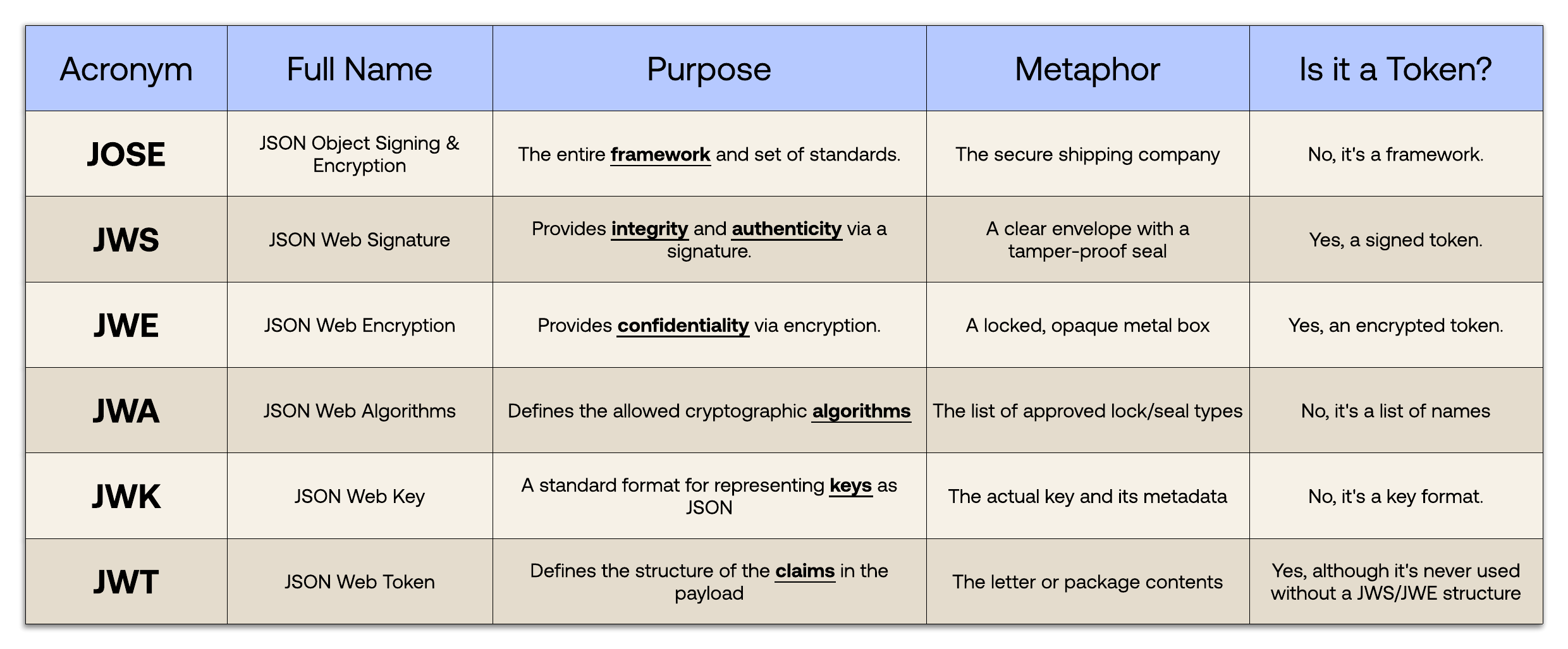
JWT defines the token format and uses complementary specifications to handle signing and encryption, this collection of specifications is known as JOSE (JavaScript Object Signing & Encryption)
- JWT (JSON Web Token) : Base 64 encoded
- JWS (JSON Web Signature) : Defines the process of digitally sign a JWT
- JWE (JSON Web Encryption) : Define the process to encrypt a JWT
- JWK (JSON Web Key) : Defines how cryptographic key and sets of keys are represented
JWTs can be signed using a secret (with HMAC algorithm) or a public/private key pair using RSA.
Let’s explain some concepts of this definition further.
- Compact: Because of its size, it can be sent through an URL, POST parameter, or inside an HTTP header. Additionally, due to its size its transmission is fast.
- Self-contained: The payload contains all the required information about the user, to avoid querying the database more than once.
JSON Web Signature (JWS)
JSON Web Signature (JWS) claims are
- signed with a signature(private key) that can be verified by the server with a secret signing key(public key).
- This ensures that the claims have not been tampered with when passed between client and server.
- The contents of the JWS token are Base64 encoded and not encrypted.
- Use JWS only when you want to exchange nonsensitive data in the claim or in the payload of the token.
A JWS is used to sign the data, making it integrity-protected:
- The rogue client or Man-in-the-middle can see the data as its base 64 encoded.
- If the rogue client or Man-in-the-middle tries to modify, the signature verification would fail.
- The server will validate the signature of the message to ensure that the claims were not tampered with by the client.
- If the server detects any kind of tampering, it can take appropriate action (deny the request or block the client, etc.).
- We can use jose4j library for creating the JWS token.
java
JsonWebSignature jws = new JsonWebSignature();
jws.setPayload(claims.toJson());// Add the issuer,audience ,subject as per your choice
jws.setKey(privateKey);//pass the private key.
jws.setKeyIdHeaderValue(“k1”);
jws.setAlgorithmHeaderValue(AlgorithmIdentifiers.RSA_USING_SHA256);
String jwt = jws.getCompactSerialization();
System.out.println(“JWT: “ + jwt);
JWE (JSON Web Encryption)
- JWE scheme encrypts the content instead of signing it.
- The content being encrypted here are JWT claims.
- JWE, thus brings Confidentiality.
- The JWE can be signed and enclosed in a JWS. Now, you get both encryption and signature (thus getting Confidentiality, Integrity, Authentication).
JWKs (JSON Web Key Set)
- JSON Web Key Set (JWKS) is a set of keys which contains the public keys used to verify any JSON Web Token (JWT) issued by the authorization server and signed using the RS256 signing algorithm.
- The JWK format allows the key to be decorated with metadata.
- An important piece of metadata is the key ID (“kid”), for key identification in databases and enabling key rollover.
- The usage parameter (“use”) indicates the key’s intended purpose — signing or encryption
- JSON Web Keys (JWK) can be easily generated with
java
import java.util.*;

import com.nimbusds.jose.jwk.*;
import com.nimbusds.jose.jwk.gen.*;

public void generateJWK() {
    // Generate 2048-bit RSA key pair in JWK format, attach some metadata
    RSAKey jwk = new RSAKeyGenerator(2048)
    .keyUse(KeyUse.SIGNATURE) // indicate the intended use of the key
    .keyID(UUID.randomUUID().toString()) // give the key a unique ID
    .generate();

    // Output the private and public RSA JWK parameters
    System.out.println(jwk);

    // Output the public RSA JWK parameters only
    System.out.println(jwk.toPublicJWK());
}
java
import java.security.*;
import java.security.interfaces.*;
import java.util.*;

import com.nimbusds.jose.jwk.*;
import com.nimbusds.jose.jwk.gen.*;

public void generateRSAandConvertToJWK() {
    // Generate the RSA key pair
    KeyPairGenerator gen = KeyPairGenerator.getInstance("RSA");
    gen.initialize(2048);
    KeyPair keyPair = gen.generateKeyPair();

    // Convert to JWK format
    JWK jwk = new RSAKey.Builder((RSAPublicKey)keyPair.getPublic())
        .privateKey((RSAPrivateKey)keyPair.getPrivate())
        .keyUse(KeyUse.SIGNATURE)
        .keyID(UUID.randomUUID().toString())
        .build();
}